Before installing, make sure your device has enough storage and back up important WhatsApp chats and media. GB WhatsApp is not an official WhatsApp application, so understand the differences and risks before switching from the official app.
GB WhatsApp App Information
Here is the basic information you may want to check before downloading the APK.
| App Name | GB WhatsApp |
|---|---|
| Latest Version | v18.80 |
| Platform | Android |
| Android Requirement | Android 5.0+ |
| File Type | APK |
| App Category | Communication |
| Developer | Third-party developer |
| Official WhatsApp App | No |
| License | Free to download |
The version number and APK details can change when a new build becomes available. If you are using an older release, compare its features and compatibility before updating.
How to Download and Install GB WhatsApp App
Installing an APK is slightly different from installing an app through Google Play. If this is your first time using a third-party Android APK, follow the steps below.
- 1
Back Up Your WhatsApp Data
Before changing apps, create a backup of important chats and media. Keep your existing data until you have confirmed that everything you need is available after the switch.
- 2
Download the GB WhatsApp APK
Download the version you want and check its version number and file information before opening it.
- 3
Allow APK Installation
Android may ask you to allow your browser or file manager to install applications from that source. The exact setting can vary depending on your Android version and phone manufacturer.
- 4
Install the APK
Open the downloaded APK and follow the Android installation prompts. If the installation fails, check your available storage, Android version, and whether another WhatsApp installation is causing a package conflict.
- 5
Verify Your Phone Number
Open GB WhatsApp and enter your phone number. Complete the verification process using the SMS or call option available on your device.
- 6
Restore Your Chats
If the build supports the backup or migration method you are using, follow the restore instructions and check your chats and media after setup.
Important: Do not delete your previous WhatsApp data immediately. Make sure your important conversations, photos, videos, and documents are available first.
What Is GB WhatsApp?
GB WhatsApp is a modified Android client based around the WhatsApp messaging experience. Unlike the official application, modified builds typically add extra options for privacy, customization, messaging, and media.
People usually look for GB WhatsApp because they want more control over how the app looks or what activity other contacts can see.
For example, users may want to hide their online status, change themes, customize fonts, download status updates, or use additional messaging controls.
There is an important trade-off, though. GB WhatsApp is not developed or supported by WhatsApp. WhatsApp considers modified clients unofficial and warns users about potential security, privacy, and account-access risks.
So GB WhatsApp is best understood as a third-party alternative for Android users who want additional controls, rather than an official replacement for WhatsApp.
GB WhatsApp Features You Can Actually Use
The exact features depend on the build you install, but GB WhatsApp is mainly known for giving users more control over privacy and customization.

Privacy Features
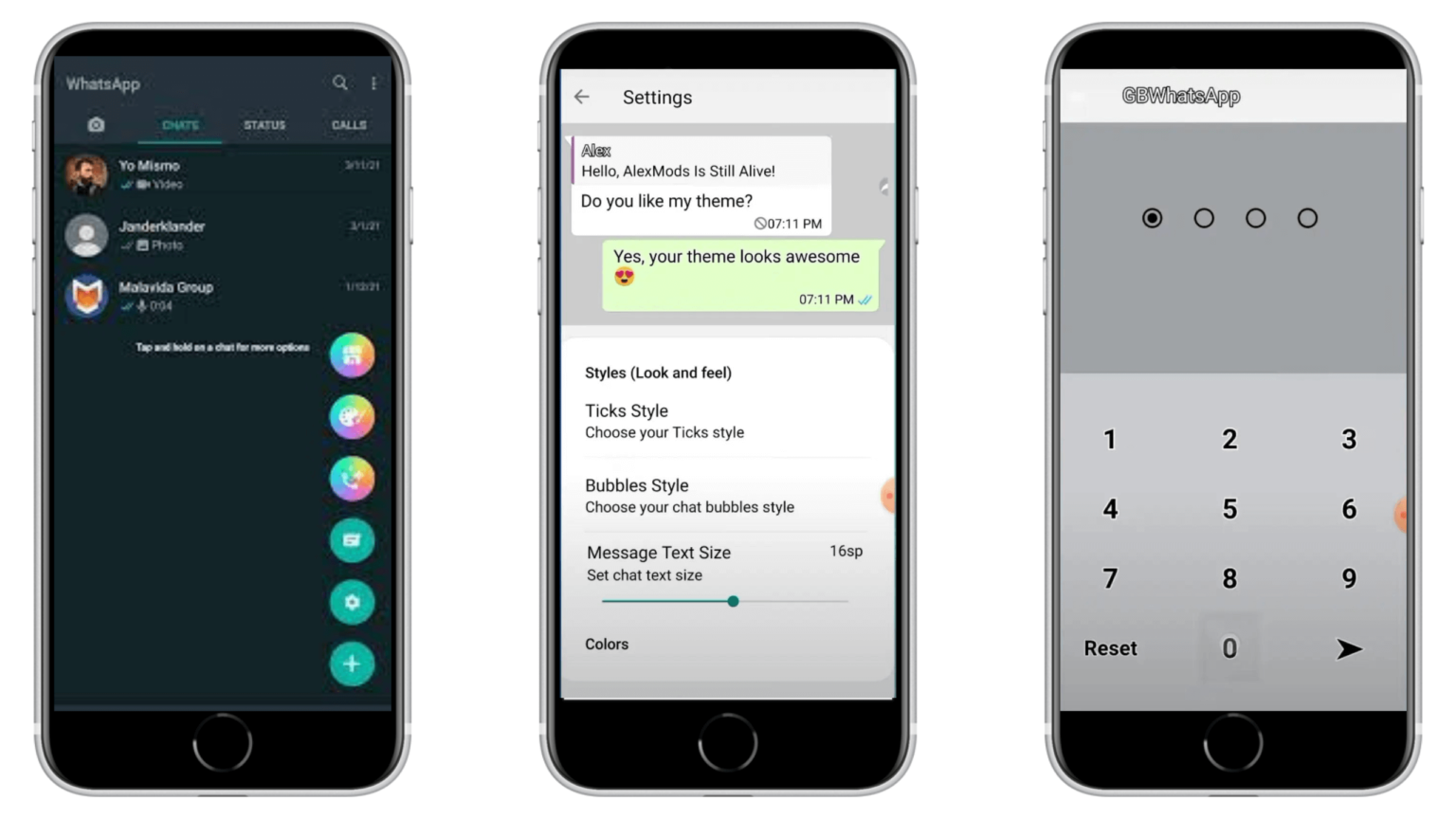
GB WhatsApp commonly includes additional controls for online status, last seen, blue ticks, typing indicators, and other activity information.
These settings are useful if you want to use WhatsApp without making every activity visible to your contacts.

Custom Themes and Interface
The standard WhatsApp interface offers relatively limited customization. GB WhatsApp builds generally provide more options for themes, fonts, wallpapers, colors, icons, and chat appearance.
You can use these settings to give individual conversations or the entire app a different look.

Messaging Options
Depending on the version, GB WhatsApp may include auto-reply, message controls, larger media-sharing options, and other features designed to give users more flexibility when communicating.

Status and Media Tools
Some builds also provide additional controls for WhatsApp Status and media, including options for saving status content and managing how media is displayed or shared.
Because these are third-party builds, features can change between versions. A feature available in one release may be renamed, moved, changed, or removed in another.
How to Use Popular GB WhatsApp Features
Downloading GB WhatsApp is only the beginning. Many users install it because they want to change one particular setting.
Hide Online Status
Open the privacy settings in GB WhatsApp and look for the option controlling online visibility. Choose the available setting that prevents your online activity from being shown to other contacts.
Freeze Last Seen
If your version includes Freeze Last Seen, open the privacy settings and enable the option. Your displayed last-seen information can then remain unchanged while you continue using the app.
Hide Blue Ticks
Go to the privacy settings and look for the read-receipt or blue-tick controls. Select the option that matches how you want read information to appear to your contacts.
Hide Typing Status
Look for the typing indicator setting under the privacy or privacy-related controls. If supported by your build, enabling it can prevent the usual typing notification from appearing.
Change GB WhatsApp Themes
Open the Themes or customization section and choose a theme available in your version. Some builds also allow users to import or download compatible themes.
Menu names can differ between releases, so don't worry if your settings are located somewhere slightly different.
GB WhatsApp vs Official WhatsApp
The biggest difference between the two apps is not simply the number of features. It is the difference between using an unofficial modified client and an application officially developed and supported by WhatsApp.
| Feature | GB WhatsApp | Official WhatsApp |
|---|---|---|
| Custom themes | More options | Limited |
| Privacy customization | More controls | Standard controls |
| Interface customization | Extensive | More limited |
| Official support | No | Yes |
| Google Play distribution | No | Yes |
| Official security support | No | Yes |
| Account restriction risk | Higher | Lower |
| Updates | Third-party builds | Official updates |
If your priority is official support, account stability, and predictable updates, the official WhatsApp app is the straightforward choice.
If customization and additional privacy controls matter more to you, GB WhatsApp may appear more attractive. The important thing is to understand that those extra features come with additional risks.
Why Do People Choose GB WhatsApp?
GB WhatsApp attracts users for several practical reasons rather than one single feature.
Some users want more control over their online visibility. Others care about themes, fonts, chat customization, status tools, or additional messaging options.
The main appeal can be summarized as more control and more customization.
However, these benefits should be considered alongside the limitations. GB WhatsApp does not have the same official support as WhatsApp, and using an unofficial client can create account and security concerns.
For that reason, the right choice depends on what matters most to you. If additional customization is important, GB WhatsApp offers more options. If official support and account security are your priorities, the standard WhatsApp app remains the safer choice.
Is GB WhatsApp Safe to Use?
GB WhatsApp should not be described as completely safe simply because an APK installs successfully or works without problems.
There are several different risks to consider.
File safety: A third-party APK can potentially be modified or repackaged, especially when obtained from an unknown source.
Privacy: Unlike the official WhatsApp app, a modified client is not controlled or supported by WhatsApp, so its security and privacy practices cannot be treated as equivalent.
Account safety: WhatsApp does not officially support modified clients and may restrict accounts that use them.
This means "safe" depends on what you are measuring. An APK might pass a malware scan while the account is still exposed to the risks associated with using an unofficial WhatsApp client.
For that reason, check the APK information before installing, use a reputable security scanner, keep important data backed up, and do not treat claims such as "100% safe" or "guaranteed anti-ban" as guarantees.
Can GB WhatsApp Get Your Account Banned?
Yes, there is a real risk of account restriction.
WhatsApp does not officially support GB WhatsApp or other modified WhatsApp clients. WhatsApp's guidance states that users of unofficial applications may receive temporary bans and may need to switch to the official application.
This is also why the term Anti-Ban should be treated carefully. A modified app cannot guarantee that WhatsApp will never restrict an account.
If you want to reduce unnecessary account problems, avoid behavior that can trigger WhatsApp restrictions, such as spam, bulk messaging, or automated activity.
If WhatsApp restricts your account, use the official review or support process provided by WhatsApp rather than relying on a third-party service claiming that it can remove the ban.
How to Transfer WhatsApp Chats to GB WhatsApp
Your chat history is often the biggest concern when switching from official WhatsApp to GB WhatsApp.
The safest approach is to prepare your data before changing applications.
Start by backing up your important conversations and media. Keep the original backup and existing data until you have checked the new installation.
After installing GB WhatsApp, follow the restore or migration process supported by your particular build. Once setup is complete, check several important conversations, photos, videos, and documents.
Do not assume that every official WhatsApp backup will automatically restore inside a modified client. Compatibility can vary, and WhatsApp does not guarantee successful chat transfer between unofficial applications and the official app.
If your chats are especially important, keep separate copies of irreplaceable media and documents before switching.
What Is New in GB WhatsApp v18.80?
GB WhatsApp v18.80 is the current version listed on this site.
Recent third-party release information for this build highlights changes involving messaging, media controls, interface behavior, backups, and stability improvements. Depending on the specific build, users may also find updated options for message editing, media sharing, message pinning, and other everyday controls.
Because GB WhatsApp does not publish an official WhatsApp changelog, release information can vary between different builds and distributors.
If you are currently using v18.70 or another older release, compare the actual changes before updating. A newer version is not automatically better for every device or user.
GB WhatsApp Old Versions
Sometimes the newest version isn't the version a user wants.
You may prefer an older release because its interface is familiar, a particular feature worked differently, or the previous build performed better on your device.
Here are some of the versions users may look for:
| Version | Best For |
|---|---|
| v18.80 | Users looking for the latest release |
| v18.70 | Users who prefer the previous build |
| Older versions | Compatibility or previous feature preferences |
Older APKs also have disadvantages. They may lack newer fixes, work poorly with current Android versions, or contain bugs that were addressed in later releases.
If you decide to use an old version, check its Android compatibility and keep a backup before changing your current installation.
GB WhatsApp Troubleshooting
Even when the APK is installed correctly, you may run into problems during setup or everyday use.
GB WhatsApp Won't Install
Check your Android version and available storage first. If another WhatsApp package is installed, the two packages may conflict depending on the build.
Verification Code Isn't Arriving
Check your phone signal, confirm that the number is correct, and wait before requesting another code. Repeated verification requests can sometimes cause additional delays.
GB WhatsApp Keeps Crashing
Make sure the build is compatible with your Android version and that the app has enough storage and required permissions. If the problem started immediately after an update, an earlier compatible version may work better.
Chats Cannot Be Restored
Backup compatibility can vary between official WhatsApp and modified clients. Keep your original backup and check whether your particular GB WhatsApp build supports the restore method you are trying to use.
Calls Are Not Working
Check microphone and camera permissions, your internet connection, and whether the problem occurs with both Wi-Fi and mobile data. If only GB WhatsApp has the problem, the issue may be related to the particular build.
GB WhatsApp Alternatives
GB WhatsApp isn't the only option available to Android users.
Some people compare it with other modified WhatsApp clients such as FM WhatsApp or YOWhatsApp because they are also associated with additional customization and privacy features.
The important point is that moving from one modified WhatsApp client to another does not make it an official WhatsApp experience. Similar security, privacy, update, and account-related considerations still apply.
If you want:
Official support and maximum account stability: use WhatsApp.
More customization and additional controls: GB WhatsApp may be worth considering if you understand the trade-offs.
A different modified experience: compare alternatives based on the exact features you need rather than relying on "anti-ban" or "100% safe" claims.
Frequently Asked Questions About GB WhatsApp
GB WhatsApp can use a phone number for account verification, but using an unofficial client carries a risk of account restriction. Consider the importance of the number before switching.
Yes, but chat transfer is not guaranteed when moving between an unofficial client and official WhatsApp. Keep your original backup and important media before switching.
Not necessarily, but you should never assume that all chats and media will transfer automatically. Back up your data first and verify the result after installation.
GB WhatsApp is distributed as an Android APK. There is no official GB WhatsApp APK installation method for iPhone.
Yes, if you can obtain a compatible build, but older releases may have fewer features, compatibility issues, or unresolved bugs. Check the version requirements before installing one.
Follow the official WhatsApp review or support process shown for your account. Avoid services that claim they can guarantee removal of an account restriction.
No. GB WhatsApp is a third-party modified client and is not an official WhatsApp application.
Final Thoughts
GB WhatsApp is mainly aimed at Android users who want more customization, privacy controls, and messaging options than the standard WhatsApp experience provides.
Before downloading it, however, consider the complete picture. You should know which version you are installing, how to back up and transfer your chats, what features you actually need, and what risks come with using an unofficial client.
If those trade-offs are acceptable to you, you can check the latest APK information above and choose the version that best fits your device. If official support, security assurances, and account stability matter more, the official WhatsApp application remains the better option.